
Características
https://www.robot-forum.com/robotforum/thread/48109-3hab2312-2-boot-disc-for-s4-needed/
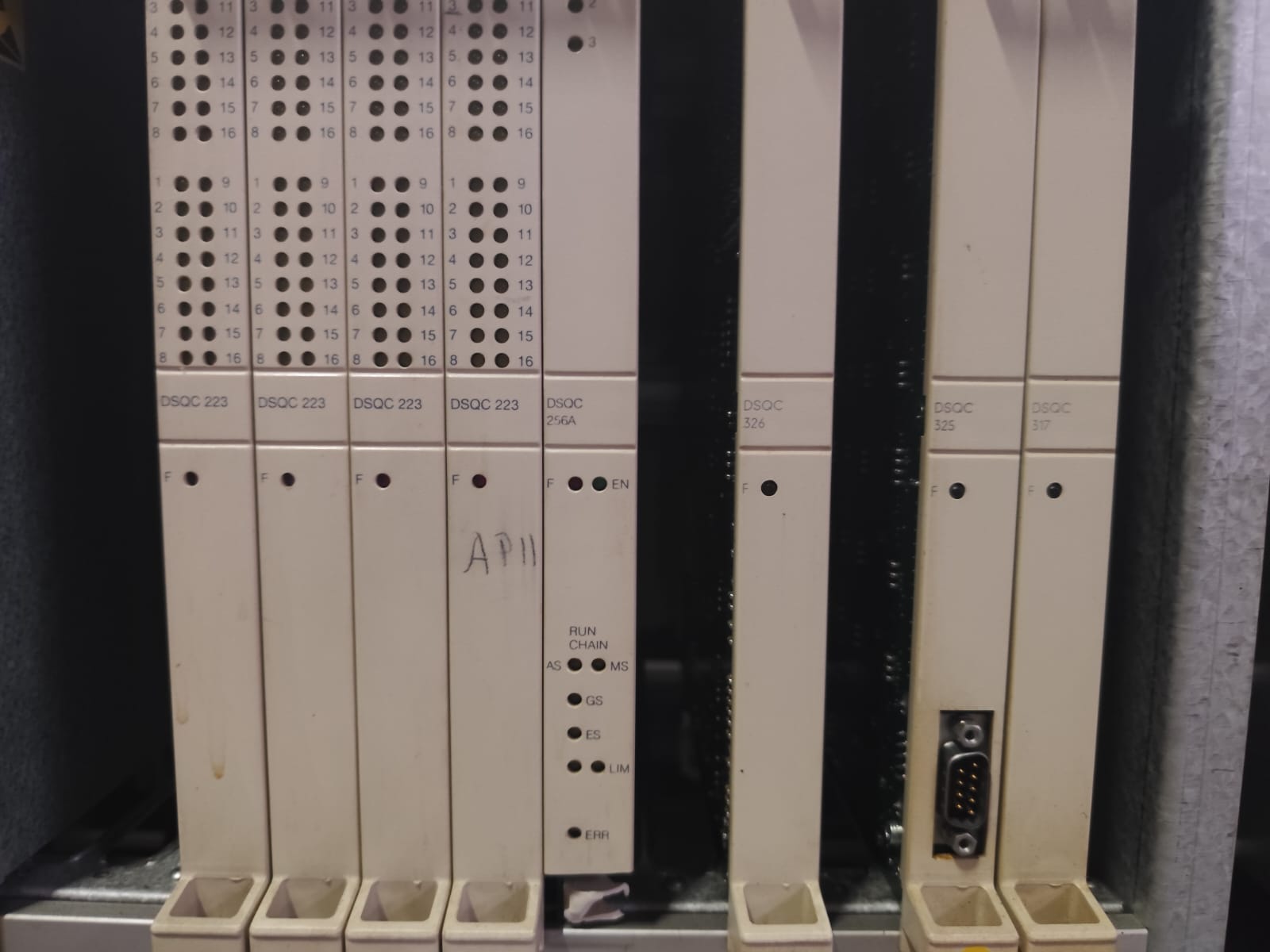
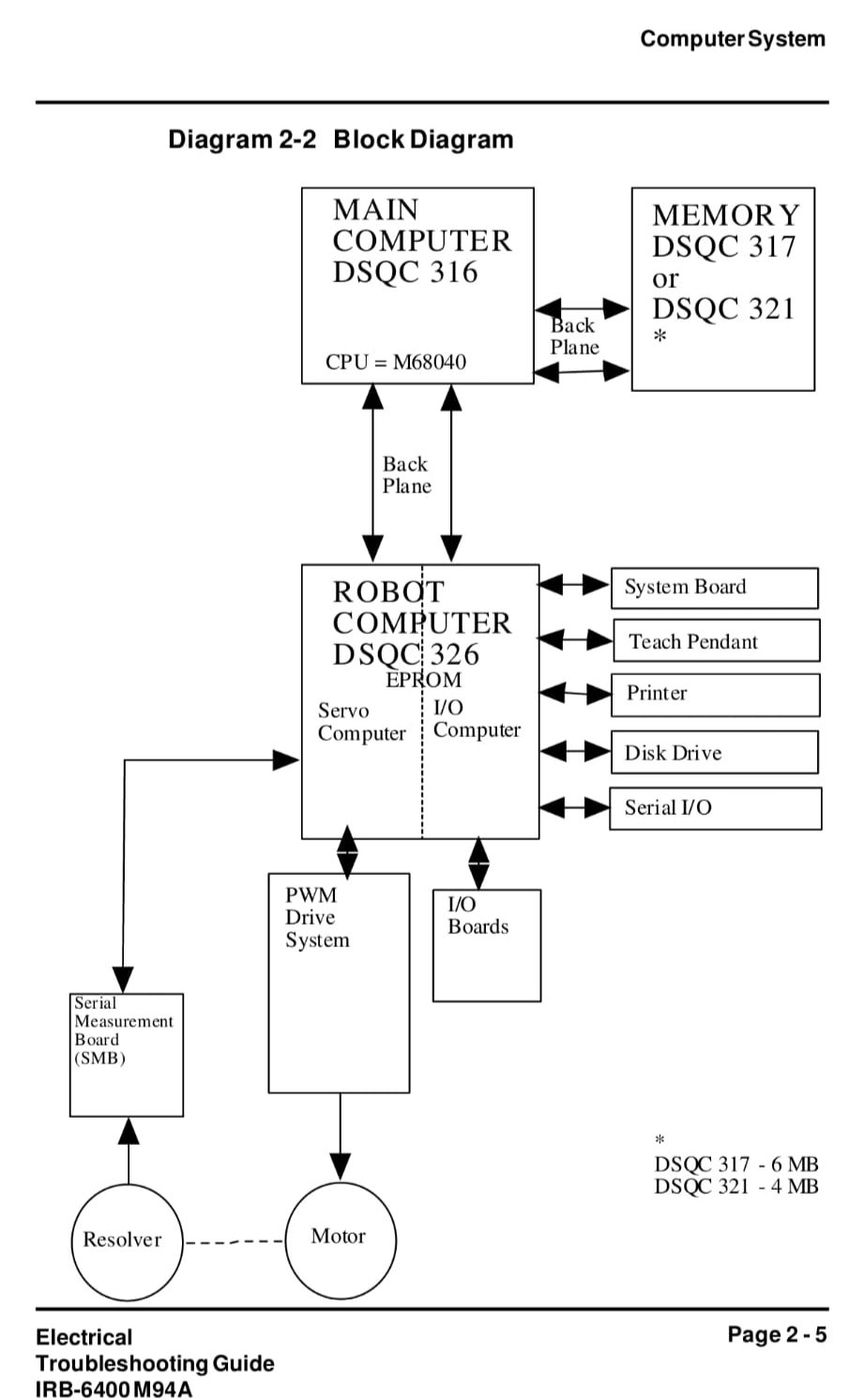
DSQC 317 Memory Board
DSQC 325 Main Computer
DSQC 326 Robot Computer
DSQC 256A System Board
DSQC 223 (x4) Digital I/O Board
ELECTRICAL_TROUBLESHOOTING_MANUAL_FOR_IRB6400_INDUSTRIAL_ROBOT_&_S4_CONTROL_SYSTEM.pdf
Información extra sobre la compatibilidad con el software
https://www.robot-forum.com/robotforum/thread/603-irb6400-m94a-boot-discs/?pageNo=5
I/O parameters are in the User Manual starting at page 12-9.
Regarding the I/O boards, I suggest making parameter changes thru the teach pendant.
Great news that you have it running. Just guessing but it appears you have (2) BaseWare 2.1 disk packages for the IRB6400 - one labeled for the M94A IRB6400 and the other labeled for the M96 IRB6400. Could be that the load disk in the M94A disk pack is bad
While BaseWare OS 2.1 itself has no M96 version, there are IRB disks that go with BW2.1 for the IRB6400 that are either Elmo/Siemens (M94A) or M96. Perhaps the disk pack is labeled M96 to show which version IRB disk it contained. The IRB1400, 2400 & 3400 also ran BW 2.1 with their version IRB disks but only the IRB6400 robot had M94A & M96 versions manipulators.
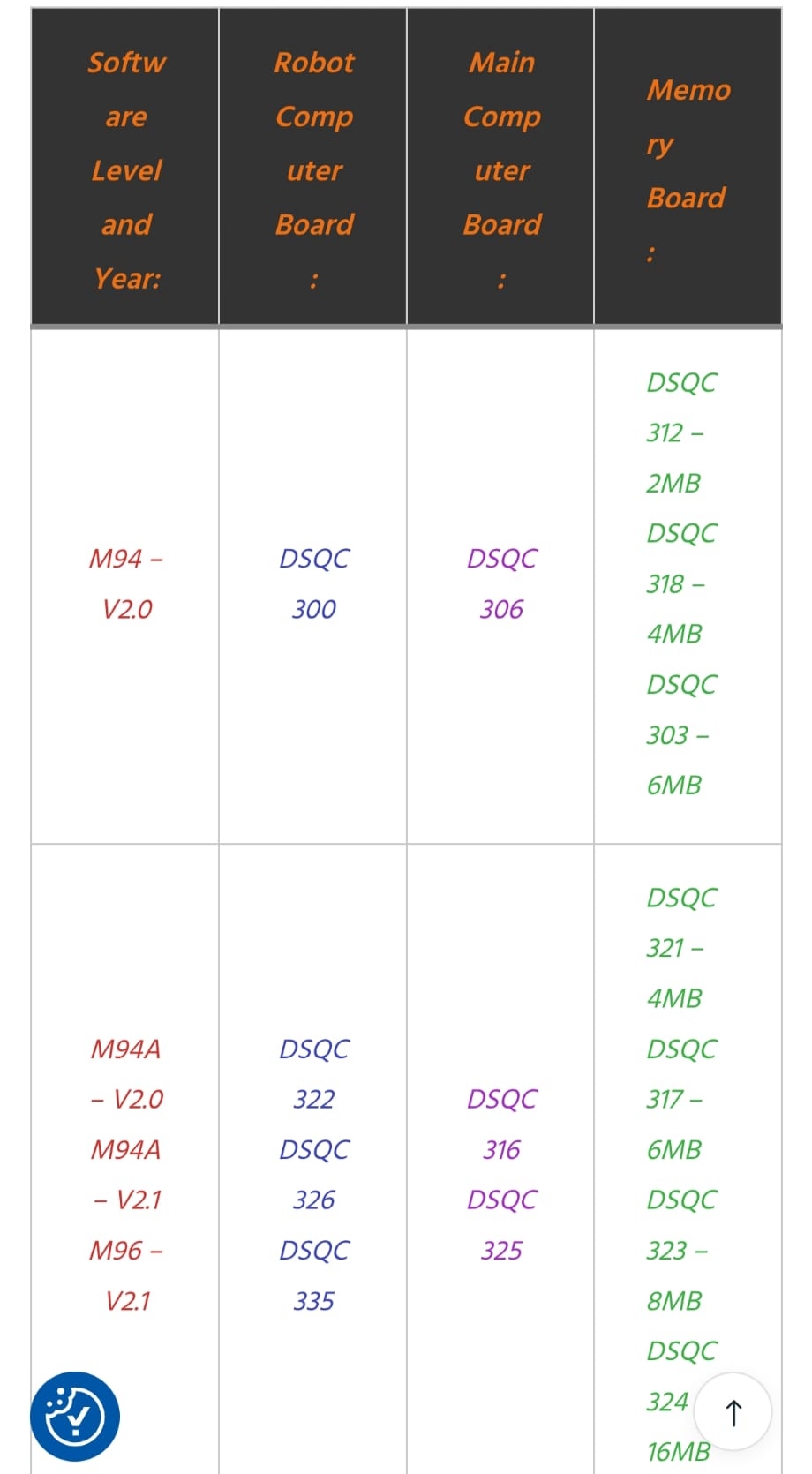
BaseWare OS 2.1 is compatible with:
All 3 Robot Computer boards (DSQC300, 326, 335) as long as the installed firmware EPROMs were the RND/RNE or newer.
All 3 Main Computer boards are technically compatible but the slower 20Mhz DSQC306 can have external axis issues, the 25Mhz DSQC316 solves that but still lacks an internal power failure function available in BW2.1 & newer that the DSQC325 fixes.
External Memory boards DQSC317, 323, 324.
The DSQC325, 326, 323 combination is very compatible with BW2.1 as this was the standard setup for thousands of robots in GM, Chrysler, Ford & many others. I've personally loaded BW2.1 in well over a hundred S4 robots in this board configuration regardless of manipulator type.
Somewhat bewildered by changes needed in the MOC file unless it was to add an external axis. The IRB disk during the software load sets up the MOC file with the proper motors and associated parameters. The only editing of the MOC normally needed would be to correct the Fine Calibration data and to add external axes.
¡Qué buena noticia que lo tengas funcionando! Es solo una suposición, pero parece que tienes dos paquetes de discos con la versión base 2.1 para el IRB6400: uno para el IRB6400 m94a y el otro para el IRB6400 m96. Es posible que el disco de carga del paquete de discos m94a esté dañado.
Si bien el sistema operativo base 2.1 no tiene una versión m96, existen discos IRB compatibles con BW2.1 para el IRB6400, que son Elmo/Siemens (m94a) o m96. Quizás el paquete de discos esté etiquetado como m96 para indicar qué versión del disco IRB contenía. Los IRB1400, 2400 y 3400 también ejecutaban BW2.1 con sus discos IRB, pero solo el robot IRB6400 tenía manipuladores de las versiones m94a y m96. El sistema operativo base 2.1 es compatible con:
Las tres placas de computadora robótica (DSQC300, 326, 335), siempre que las EPROM de firmware instaladas sean RND/RNE o posteriores.
Las tres placas de computadora principal son técnicamente compatibles, pero la DSQC306 de 20 MHz, más lenta, puede presentar problemas con los ejes externos. La DSQC316 de 25 MHz soluciona este problema, pero aún carece de la función de fallo de alimentación interna disponible en BW2.1 y posteriores, que la DSQC325 corrige.
Las placas de memoria externa DQSC317, 323, 324.
La combinación DSQC325, 326, 323 es muy compatible con BW2.1, ya que esta era la configuración estándar para miles de robots en GM, Chrysler, Ford y muchos otros. Personalmente, he instalado BW2.1 en más de cien robots S4 con esta configuración de placa, independientemente del tipo de manipulador.
Estoy un poco desconcertado por los cambios necesarios en el archivo MOC, a menos que sea para añadir un eje externo. Durante la carga del software, el disco IRB configura el archivo MOC con los motores y parámetros asociados adecuados. La única edición del MOC que normalmente se necesita es corregir los datos de calibración fina y añadir ejes externos.
No Comments